

NOTE: 26SEP2025 - This article is a work in progress. When you have questions or suggestion feel fere to share by contacting the team using the blue Ask the Team button in the bottom right of the screen.
On this page:
Why this matters
In aviation, airspace limits and traffic reporting are barometric‑based (altitudes on QNH or flight levels on 1013.2 hPa). Obstacles are published as AMSL and/or AGL (geometric), terrain is published as AMSL, but in flight you typically compare your barometric altimeter (on QNH) to AMSL values.
Phones, tablets, and many portable receivers provide GPS‑based altitude. Knowing the difference — and applying safe margins — helps you avoid airspace infringements, maintain obstacle clearance, and interpret Electronic Conspicuity (EC) traffic sensibly.
Altitude vs Height vs Elevation — quick definitions
Altitude is vertical distance above mean sea level (AMSL) as indicated on a barometric altimeter set to QNH. Height is vertical distance above a specified local datum — most commonly the ground at the aircraft’s position (AGL) or the airfield when using QFE. Elevation is the AMSL altitude of a fixed point on the ground (for example, an airport’s surveyed elevation).
Three key points
GPS vertical accuracy is weaker than horizontal. Even when parked, GPS altitude can wander. Satellite geometry and cockpit blockage/multipath further degrade the vertical solution.
Airspace uses barometric altitude, not GPS. A barometric altimeter, set to QNH/QFE or 1013.2 hPa, is the reference for ATC and charts (even in apps).
GPS “ellipsoid” altitude is not MSL. GPS measures height above a smooth ellipsoid; charts use Mean Sea Level (MSL) that follows the geoid. See Deep dive: Ellipsoid vs geoid for more information. Electronic devices may output MSL or ellipsoid depending on platform — see Where each reference comes from.
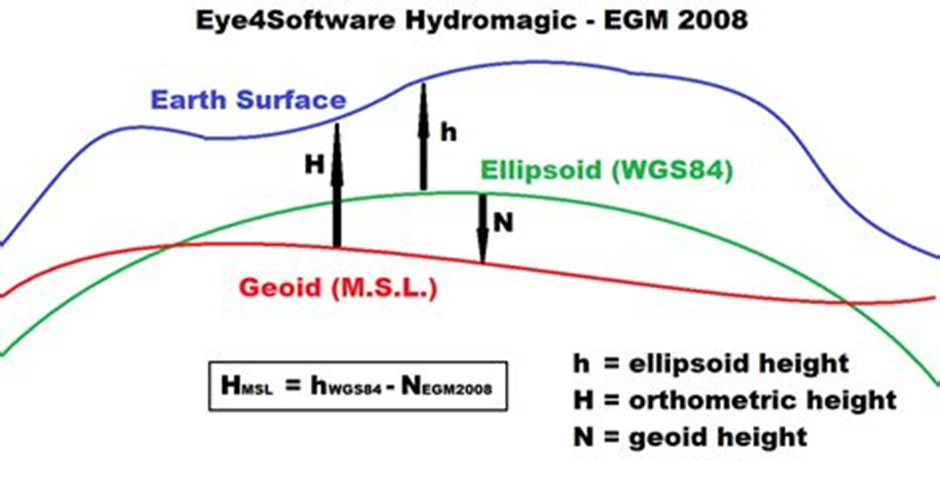
Ellipsoid (WGS‑84) vs geoid (MSL): GPS measures h (ellipsoid height); charts use H (MSL); the difference is the geoid height N. This is why a GPS can show a constant offset from airport elevation.
Geoid height N can be positive or negative depending on where you are on Earth — positive where the geoid sits above the ellipsoid (e.g., much of Alaska), negative where it sits below (e.g., most of the contiguous USA; parts of Europe vary and can be near‑zero, slightly positive or slightly negative).
Section 1. Understanding altitude references and their errors
1.1 The references at a glance
AMSL / MSL (Altitude): Feet above mean sea level using QNH. Shown on most charts.
AGL (Height): Feet above the ground at that location. Used for obstacle clearance and some airspace limits.
Flight Level (FL): Pressure-based level with altimeter set to 1013.25 hPa (29.92 inHg), i.e., QNE. Example: FL095.
Barometric altitude: What a pressure altimeter reads.
With QNH: indicates altitude (AMSL).
With QFE: indicates height above the airfield (AGL at the field).
With 1013.25 hPa (QNE): indicates flight level.
GPS altitude: Based on satellites (GNSS). It can be:
Height above the ellipsoid (mathematical Earth shape), or
"AMSL" after the device applies a geoid correction.
1.2 Where each reference comes from
Barometric altimeter: Measures air pressure and converts it to altitude using QNH/QFE/1013.25 so everyone matches charts and ATC.
GPS system: Measures geometric height above the WGS‑84 ellipsoid. To get sea‑level altitude (MSL), it applies
H = h − N(ellipsoid height minus geoid height). Around the world, the ellipsoid can sit about −100 m to +70 m from the geoid (your device may or may not correct this).Mobile phones/tablets (what the OS gives to apps — 2025):
iOS: reports altitude relative to MSL (orthometric height
H) via Apple’s geoid model.Android: typically returns ellipsoidal height
h(WGS‑84) from the Fused Location/GNSS APIs. Some OEMs convert to MSL (H) without indicating it, and there is no standard way for apps to detect which reference is used.
External GPS receivers: Many output ellipsoid height only. Some apply a geoid model to give MSL, others do not. Always check the device spec and, if needed, convert with
H = h − N— see Deep dive: Ellipsoid vs geoid.Transponder/ADS‑B: Sends barometric altitude set to 1013.25 hPa, not GPS altitude.
1.3 Typical error sources and magnitudes
Barometric/pressure side
Setting error: 1 hPa ≈ 27–30 ft. A 3 hPa mistake ≈ 90 ft.
Temperature (non‑ISA): Colder than ISA = you are lower than indicated over terrain; hotter = higher. Rule of thumb: about ±0.35% per °C from ISA at sea level. At 10,000 ft and ISA+15, the difference can be several hundred feet.
Instrument/position error: Static source and installation errors, typically tens of feet in light GA.
GPS side
Vertical geometry: Vertical accuracy is naturally worse than horizontal.
Cockpit environment: Canopy/wing/fuselage/structure blocking the sky and signal reflections (multipath) add error.
What to expect (consumer devices):
Good sky view: often 30–100 ft (95%).
Poor geometry/blockage: short spikes of 100–300+ ft.
SBAS (WAAS/EGNOS): Usually steadier, but still advisory only for separation/compliance.
Reference mismatch:
GPS gives ellipsoid height
h. Charts use MSL heightH.Convert with
H = h − N(N= geoid height). Without this correction, you can see a constant local offset of tens to a few hundred feet.
Filtering/latency: During climbs/descents, smoothed GPS can lag or jump.
Cross‑system issues
Mixed sources: Apps and EC devices often relay traffic through multiple sharing networks, converting altitude references along the way (
baro/FL ↔ GPS‑MSL ↔ baro estimate). The original reference is frequently lost; small offsets accumulate; and the displayed altitude can be off by tens to hundreds of feet, particularly during climbs and descents.
Section 2. Vertical limits categories and how to use them
2.1 Airspace limits (AMSL, AGL and Flight Levels)
How they’re published
AMSL: “SFC to 3500 ft AMSL”, “2200 ft AMSL to 5500 ft AMSL”. Compare with your altimeter set to QNH.
AGL: "GND to 2000ft AGL".
FL: “FL055 to FL095”, “FL100 and above”. Compare with your FL on 1013.2 hPa.
Transition altitude/level: Below Transition Altitude (TA) use altitudes (QNH); above Transition Level (TL) use FL. The transition layer sits in between. Check your state AIP.
How to comply
Below TA: Set QNH. Match indicated AMSL to AMSL limits.
Above TL: Set 1013.2 hPa. Match FL to FL limits.
GPS only: Never skim a boundary; keep generous margins. Prefer connected barometric sources for steadier app awareness.
Gotchas
Regional QNH changes: Not updating can shift indicated altitude by 100+ ft.
2.2 Ground obstacles and terrain (AGL/AMSL)
How they’re published
Obstacles: Often given as AMSL and AGL (e.g., 1840 ft AMSL / 320 ft AGL).
Temporary structures (cranes/wind turbines): Check NOTAMs and AIP for current elevations.
How to use in flight
For AGL‑based rules you need height above local terrain. Apps estimate AGL from terrain databases plus your altitude source.
Prefer baro altitude on correct QNH and cross‑check with AGL readouts. Add margin in cold weather or with uncertain sources.
Cold temperature: Increase terrain/obstacle margins; cold makes you lower than indicated over terrain.
GPS/app considerations
Because AGL is derived from GPS minus AMSL plus terrain, any MSL offset or GPS noise flows into AGL. Calibrating AGL on the ground removes constant offsets, not noise spikes.
Widen margins when vertical accuracy/VDOP indicators degrade.
2.3 Altitude relative to other traffic (EC caveats)
The reliability of “relative altitude” between you and another target depends entirely on the chain of sources and conversions used. Many Electronic Conspicuity (EC) systems pass on information from other sources, convert barometric to GPS and vice versa, and in the process the original altitude reference is in most cases lost. Two identical systems that share the same conventions tend to match well; mixed or unknown chains can accumulate errors into the hundreds of feet.
Best‑case scenarios
FLARM ↔ FLARM: Usually consistent because both sides use the same processing and altitude reference handling.
Partner‑app traffic (EasyVFR with SafeSky ↔ EasyVFR with SafeSky): Both systems treat ownship and traffic GPS altitudes as AMSL (geoid) for consistency, using the same conversion rules. This makes those targets more consistent with each other.
Mixed/unknown chains (caution)
ADS‑B/Mode S barometric altitude fused into an app that prefers GPS‑MSL.
Network rebroadcast converting between baro and GPS altitudes.
Devices estimating “baro” from GPS or vice versa.
Result: The displayed relative altitude may include combined errors (your source + target source + conversions). The vertical margin needed can easily be hundreds of feet. Knowing “something is nearby” is still very helpful — but always scan above and below the horizon rather than staring exactly where the app points.
Operational guidance
Treat EC relative altitude as advisory unless you know both ends use the same altitude reference consistently.
Maintain see‑and‑avoid and legal altimetry; EC enhances awareness but is not a separation guarantee.
Section 3. Applying the references in practice
3.1 What this means in the cockpit
Fly the altimeter for legal separation and airspace compliance; use GPS as advisory.
For recommended GPS‑only margins, see Section 3.4.
Expect offsets between devices. Verify QNH, check airport elevation on the ground, calibrate app AGL if offered.
3.2 Which reference to use (cheat sheet)
Airspace below TA: Altimeter on QNH → compare AMSL to AMSL limits.
At/above TL: Altimeter on 1013.2 hPa → fly Flight Levels.
Terrain/obstacles: Use AGL (altimeter + terrain or app AGL).
Relative traffic: EC is advisory and keep in mind it works best when both ends use the same altitude reference consistently.
Why GPS can differ is summarized in Section 1.3 - Typical Errors.
3.3 Official Guidance on Using GPS for VFR Altitude
A common question from VFR pilots is whether official bodies like EASA, the FAA, or ICAO provide specific guidance on using GPS for primary altitude or converting it to a barometric reading.
The answer is clear and consistent across all aviation authorities: the barometric altimeter is the only legal primary reference for altitude. GPS‑derived altitude is strictly for advisory and situational awareness purposes.
Official guidance does not provide a method for converting GPS altitude to barometric altitude for compliance purposes. This is because:
They measure different things: GPS measures a geometric height, while altimeters measure atmospheric pressure. The air traffic control system and all airspace definitions are built on the barometric system.
Errors are not predictable: The difference between GPS and barometric altitude changes with weather, temperature, and location. There is no single offset or formula that works everywhere.
Key Takeaways from Official VFR Guidance:
Fly your altimeter: Your aircraft's barometric altimeter, set to the correct QNH, is your legal instrument for avoiding airspace and maintaining terrain clearance.
Use GPS for awareness: Use the GPS altitude on your tablet or portable device to enhance your overall picture. It can help you notice trends, cross‑check your position, and provide an early warning that you are approaching a vertical limit.
Apply wide margins: When using GPS for advisory awareness, always use the large safety margins (e.g., 300–500 ft) discussed in this article. Do not treat it as an exact measurement for skimming by airspace.
This guidance is found within foundational documents like the FAA's Aeronautical Information Manual (AIM), EASA's Standardised European Rules of the Air (SERA), and various advisory circulars on electronic flight bags and navigation.
3.4 Safe margins when GPS is your only vertical source
Routine: at least 200 ft.
Conservative (mixed/poor reception or unknown receiver quality): 300–500 ft.
Cold or mountainous: increase beyond the above.
Do not skim boundaries using GPS alone.
3.5 Using GPS altitude in EasyVFR 4
What EasyVFR reads and shows (2025)
iOS devices: We read the iOS location altitude, which is already referenced to MSL (H) by Apple. EasyVFR displays that value and can use it for AGL and warnings.
Android devices: EasyVFR converts the OS‑provided GPS altitude (typically ellipsoidal h) to MSL (H) using its geoid model. If an OEM/driver already outputs MSL without marking it, a double conversion could occur; use AGL calibrate to remove any constant offset.
External GPS: If the receiver outputs MSL we use it as‑is; if it outputs ellipsoid (h) we convert to MSL (H) with our geoid model. If the receiver already applied a geoid correction without indicating so, a double conversion may happen; AGL calibrate removes the resulting offset.
Calibrate on the ground
Be outdoors on the ground with good GPS reception and not in Flying Mode.
Open Status card → AGL calibrate to set current GPS altitude to zero AGL.
This removes constant offsets (e.g., geoid‑ellipsoid differences). It does not remove GPS noise or short spikes.
Prefer barometric sources when available
When both barometric and GPS altitudes are available, EasyVFR uses barometric altitude (no geoid conversion). Examples: FLARM and SkyEcho 2 provide baro and GPS (baro is used); panel systems like Dynon SkyView provide baro only. You can add barometric altitude to the Instrument Ribbon. Your aircraft altimeter remains the legal reference.
Snooze a specific warning
When cruising near a boundary, GPS‑based warnings may trigger. You can suppress the specific warning for 5 minutes or 24 hours from the pop‑up.
3.6 Practical tips to improve GPS altitude
Placement: Keep the device/antenna with a clear sky view. Avoid metallic pillars and heated/metalized windscreens.
SBAS helps: WAAS/EGNOS lock usually gives smaller, steadier errors, but still treat GPS altitude as advisory.
Do not chase short swings: Filters and geometry changes can cause lag or jumps, especially in climbs/descents.
Recalibrate after changing device, mounting, external GPS, or when flying in a region with different geoid values.
3.7 GA VFR conclusions and checklist
Practical guidance for day‑to‑day GA VFR flying:
Set and verify QNH: Before departure and when obtaining new ATIS/FIS. Cross‑check on the ground against field elevation (expect ≤ 100 ft difference).
Know TA/TL: Below Transition Altitude use altitudes on QNH. At/above Transition Level use FL on 1013.2 hPa.
Margins near airspace: With baro/QNH do not skim vertical limits; with GPS‑only keep ≥ 300–500 ft from the boundary.
Cold‑weather terrain/obstacle margin: Indicated altitude can over‑read in cold air; increase AGL/AMSL margins accordingly (or apply published cold‑temp corrections for instrument procedures).
Understand device altitude: iOS typically reports MSL; some Android/external receivers report ellipsoid unless a geoid model is applied. Calibrate app AGL on the ground.
Prefer barometric sources: If available, feed your app a barometric source (e.g., encoder/transponder or device baro sensor) for steadier vertical awareness. Your aircraft altimeter remains the legal reference.
Electronic Conspicuity: Treat relative altitude as advisory unless you know both ends use the same altitude reference consistently; maintain see‑and‑avoid.
Rules of thumb: 1 hPa ≈ 27–30 ft; SBAS helps but does not make GPS altitude primary; expect occasional 100–300 ft GPS spikes.
Brief the offsets: Some regions have a geoid–ellipsoid offset of tens to >100 m; remove constant offsets by ground calibration and keep margins in flight.
Bottom line: Fly the altimeter for legal compliance; use GPS altitude as advisory.
For an accessible discussion of GPS vs barometric altitude and real‑world differences, see the Cross Country Magazine explainer “GPS versus barometric altitude: the definitive answer”.
Quick FAQ
Why do two nearby devices disagree? Different antennas, placement, SBAS status, and whether a geoid model is applied. Expect differences from a few tens of feet to a few hundred feet in poor conditions.
My indicated altitude does not match airport elevation. Most likely a geoid vs ellipsoid offset or missing calibration. Calibrate on the ground.
Can GPS altitude be used for airspace compliance? Only with large margins. Airspace is defined by barometric altitude. Fly your altimeter and use GPS as advisory.
Deep dive: Ellipsoid vs geoid
The Earth is not a perfect ball. It is slightly squashed at the poles and bumpy. To make sense of heights we use two simple reference surfaces:
Ellipsoid: a smooth balloon around the Earth. GPS measures height above this balloon — the ellipsoidal height
h.Geoid: the average sea‑level surface shaped by gravity. Height above it is the orthometric height
H(AMSL on charts).
How they relate: The geoid can sit above or below the ellipsoid by the geoid height N. Conversion:
H = h − N (MSL altitude = GPS ellipsoid height − geoid height).
Signs — easy examples:
Positive
N(geoid above ellipsoid): common in most of Alaska.Negative
N(geoid below ellipsoid): common in the contiguous United States.Europe: mixed — some Western/Northern areas slightly positive; elsewhere near‑zero or slightly negative.
Why you care: If a device shows ellipsoid height but your chart uses MSL, you will see a steady offset on the ground (tens to a few hundred feet depending on where you are). Some devices/apps remove it by applying N; others don’t.
Terms to remember:
h: ellipsoidal height (GPS native).
N: geoid height (local offset).
H: orthometric height = AMSL (charts).
Barometric altitude: what your altimeter shows on QNH/QFE/1013.2 hPa. Airspace uses this.
Relation:
H = h − N.
Keep these in mind when comparing GPS readouts with your altimeter and with published elevations.
Terminology & official definitions
Quick terms plus condensed standards wording (aligned with ICAO Annex 2; simplified for readability):
Height: Vertical distance of a level, point, or object measured from a specified datum.
Altitude: Vertical distance of a level, point, or object measured from mean sea level (MSL).
Elevation: Altitude (AMSL) of a fixed point on the Earth’s surface, e.g., an aerodrome’s surveyed elevation.
AGL (Height): Height above the ground/terrain at the aircraft’s position (local datum).
AMSL (Altitude): Altitude above mean sea level (orthometric height H).
Flight Level (FL): Surface of constant atmospheric pressure referenced to 1013.2 hPa (29.92 inHg), separated from other such surfaces by fixed pressure intervals. Example: FL095.
Pressure-altitude: Atmospheric pressure expressed as the altitude in the ICAO Standard Atmosphere that corresponds to the sensed pressure; basis for QNH/QFE/flight levels.
Barometric altitude and Altimeter settings: What a pressure altimeter indicates depends on the setting.
QNH: shows altitude above mean sea level (AMSL).
QFE: shows height above the QFE datum (typically the airfield).
1013.2 hPa (QNE): shows flight levels (FL).
Altimeter note: When we say “height” or “altitude” here, they are altimetric (pressure‑referenced), not geometric.
GPS/GNSS altitude: Altitude from GNSS. Devices may output ellipsoidal height h (above the reference ellipsoid) or altitude above MSL (orthometric height H) after applying a geoid model.
Geoid vs. ellipsoid: Relation H = h − N, where N is geoid undulation.
Transition altitude (TA):At and below TA, vertical position is expressed as altitudes using QNH (or QFE where applicable). TA is a fixed, published value.
Transition level (TL): At and above TL, vertical position is expressed as flight levels with the altimeter set to 1013.2 hPa (QNE). TL varies with current QNH; ATC/ATIS publishes the lowest usable FL.
Transition layer: Airspace between TA and TL. You climb through it switching from altitude to flight level, and descend switching from FL to altitude. Thickness varies with pressure.
Level (generic): A general term for vertical position, meaning height, altitude, or flight level.
Cruising levels: Use flight levels at/above the lowest usable FL or above the transition altitude, as applicable. Use altitudes at/below the transition altitude or below the lowest usable FL.
Minimum heights (VFR excerpts): Over congested areas/open‑air assemblies: ≥ 300 m (1,000 ft) above the highest obstacle within 600 m. Elsewhere: ≥ 150 m (500 ft) above ground or water. State rules may be more restrictive.
Electronic Conspicuity (EC): Technologies that broadcast/receive aircraft identity, position and altitude for situational awareness (e.g., ADS‑B, Mode S/ES, FLARM). Altitude is typically pressure altitude referenced to 1013.25 hPa; some devices/apps may also display or relay GPS‑derived altitude. Always identify the altitude reference when interpreting relative altitude.
i‑Conspicuity (iC): Broader ecosystem concept used by some authorities (e.g., EASA/FOCA) for an interoperable, networked environment where all airspace users are electronically visible and can exchange traffic and related data (e.g., ADS‑B/ADS‑L), supporting enhanced see‑and‑avoid and situational awareness. Our altitude guidance for EC applies equally to i‑Conspicuity systems.
ADS‑B: Automatic Dependent Surveillance–Broadcast. Broadcasts GNSS‑derived position, velocity and identity for surveillance and traffic awareness. Common links are 1090 MHz Mode S Extended Squitter and, where implemented, 978 MHz UAT. Used by ATC surveillance and many EC devices.
ADS‑L: Automatic Dependent Surveillance–Light. EASA‑promoted lightweight, interoperable EC standard for GA and drones. Apps like EasyVFR are ADS‑L‑compliant and exchange ADS‑L data over the SafeSky network. Altitude handling: The standard carries GPS altitude; the reference may be ellipsoid or geoid depending on the source. For EasyVFR↔SafeSky exchange, both systems treat ownship and traffic as AMSL (geoid) for consistency. Note that GDL90 transport expects pressure altitude (1013.25 hPa); depending on device/app conversions, displayed or relayed altitude may still be geometric or pressure‑based — always verify the reference when interpreting relative altitude.
GNSS: Global Navigation Satellite System (e.g., GPS, Galileo, GLONASS)
GPS: Global Positioning System (US GNSS)
EGNOS: European Geostationary Navigation Overlay Service (SBAS)
WAAS: Wide Area Augmentation System (US SBAS)
WGS‑84: World Geodetic System 1984 (ellipsoid used by GPS)
VDOP/PDOP: GNSS geometry quality indicators; higher values mean worse accuracy.
SBAS: WAAS/EGNOS satellite-based augmentation systems improving GNSS accuracy and integrity.
How EasyVFR 4 handles altitude sources internally
GPS (ellipsoid → AMSL): EasyVFR converts ellipsoidal GPS altitude to MSL (H) using a geoid model (Android OS feeds and most external GPS when needed).
External GPS without baro: Treated as ellipsoid unless explicitly flagged as MSL. If the source already applied a geoid correction without indicating so, EV4’s conversion may double‑apply it. Use Status Card → AGL calibrate to remove the constant offset.
AGL calibrate: Sets AGL to zero on the ground to remove constant offsets (geoid/ellipsoid or device bias). It does not remove GPS noise or short spikes.
Devices with baro and GPS (e.g., FLARM, SkyEcho 2): EasyVFR uses barometric altitude and performs no geoid conversion. Panel systems (e.g., Dynon SkyView) that provide baro only are used as‑is.
ADS‑L/SafeSky exchange: GPS altitudes in the network are handled as AMSL (geoid) by both EasyVFR and SafeSky for ownship and traffic to keep them consistent.
Android OS feeds: EasyVFR converts the OS‑provided GPS altitude to MSL (H). If a device/driver already outputs MSL (contrary to current Android documentation), a double conversion could occur; AGL calibrate fixes the offset.
References and further reading
This list provides direct links to official regulations and guidance material. All links have been verified and are free to access.
Aviation Regulations and Procedures
While core ICAO documents are paywalled, their standards are implemented in the following free national and regional rulebooks.
EASA Standardised European Rules of the Air (SERA): The binding rules for all EU member states, implementing ICAO Annex 2. This is the primary reference for European VFR flight. EASA Easy Access Rules for SERA
FAA Aeronautical Information Manual (AIM): The fundamental guide for flight procedures in the United States. It provides the practical application of regulations and is the best free resource for understanding the principles behind ICAO flight procedures (PANS-OPS/ATM). FAA Aeronautical Information Manual (AIM)
U.S. Federal Aviation Regulation (FAR) Part 91: The specific U.S. law governing general flight rules, equivalent to SERA. eCFR Title 14, Part 91
GNSS Technology and Performance
GPS.gov - Performance Standards: The official U.S. government source defining the accuracy of the GPS system. GPS Standard Positioning Service (SPS)
EGNOS Service Definition Document (SDD): The official document from the European GNSS Service Centre defining EGNOS services and performance. EGNOS Open Service SDD (PDF)
FAA Satellite Navigation: The FAA's portal for information on satellite navigation systems like WAAS. FAA GNSS Home
NOAA Geoid Models: The U.S. National Oceanic and Atmospheric Administration provides data and tools for understanding the geoid, which is key to converting GPS ellipsoid height to MSL. NOAA Geoid Page
Implementation Details & Further Reading
Readable primer: “GPS versus barometric altitude”: An excellent, non-technical explanation of the core concepts from XC Magazine. XCmag Article
Credits
Prepared from ICAO, EASA, FAA and GNSS documentation and distilled from community support discussions. EasyVFR 4 App examples are included for clarity; the principles apply to any app or device.
Bottom line: GPS altitude is a great aid for awareness but remains advisory. Airspace limits are based on barometric altitude. Fly your altimeter, and keep generous vertical margins when near airspace boundaries, obstacles and traffic.